Velogics vs Calendly
Calendly gives people a calendar. Velogics gives them a conversation that qualifies the job and books it.
Calendly is a mature scheduling tool, and a very good one for booking meetings. Velogics is for service businesses that send a booking link today: an AI that answers the lead's questions, checks the job fits and books a real slot.
Side by side
A calendar, or a conversation.
Leads for a service business often arrive with a question. Here's what each approach does with it.
Pick a time
30 min appointment
A booking link
A list of open times and a form.
The visitor picks a slot and types in their details. A booking page can ask questions, but it can't answer them. If they want to know the price or whether you cover their area first, that waits for a call back.
Velogics
A conversation that gets to the booking.
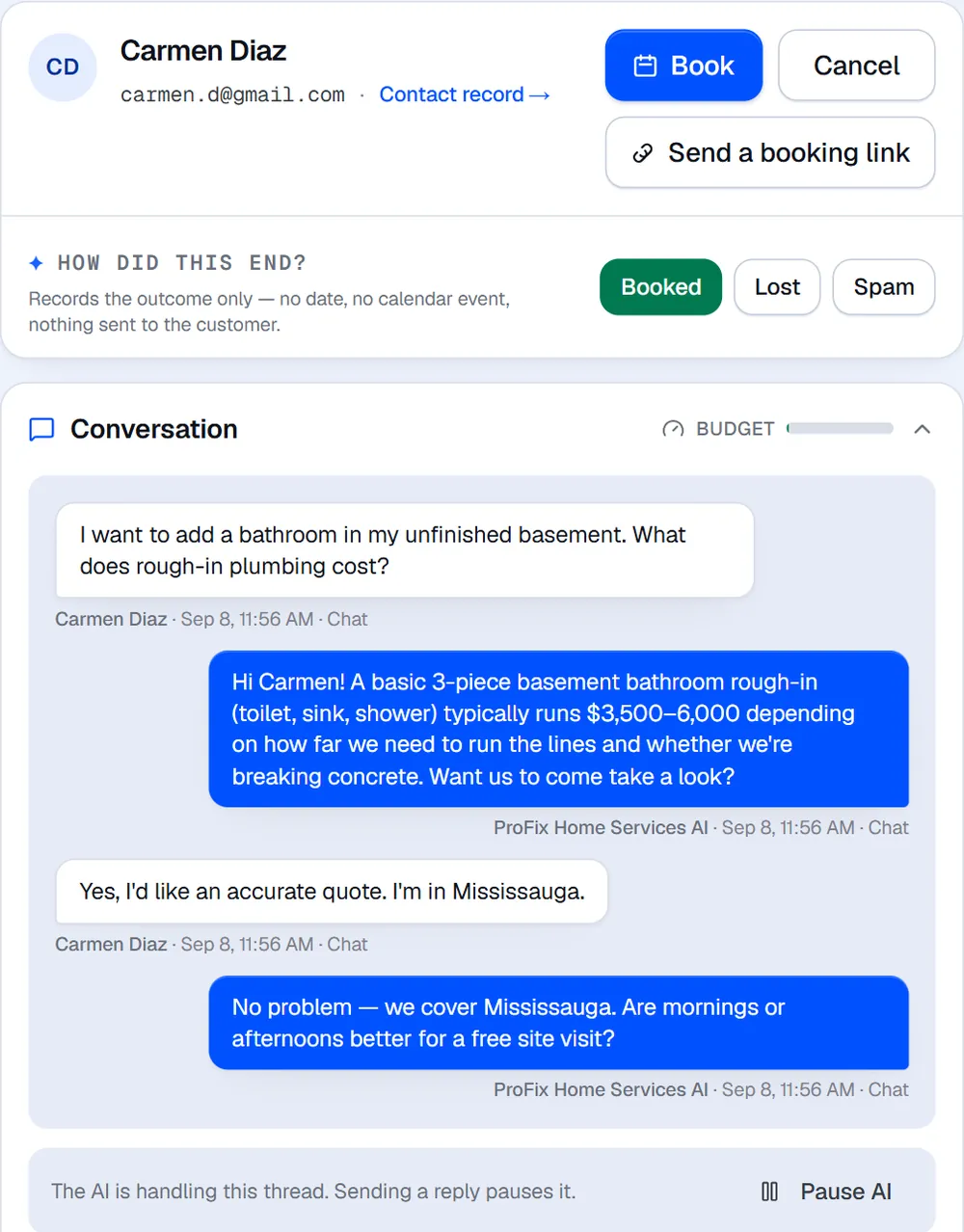
In this web chat the AI answers a price question from the business's knowledge base, confirms the job is in the service area and asks whether mornings or afternoons work, before it offers a time.
How Velogics books
Two ways in, one calendar.
Leads can talk to the AI, or book themselves on your booking page. Both land on the same calendar and in the same CRM.
The AI conversation
Answer, qualify, then book.
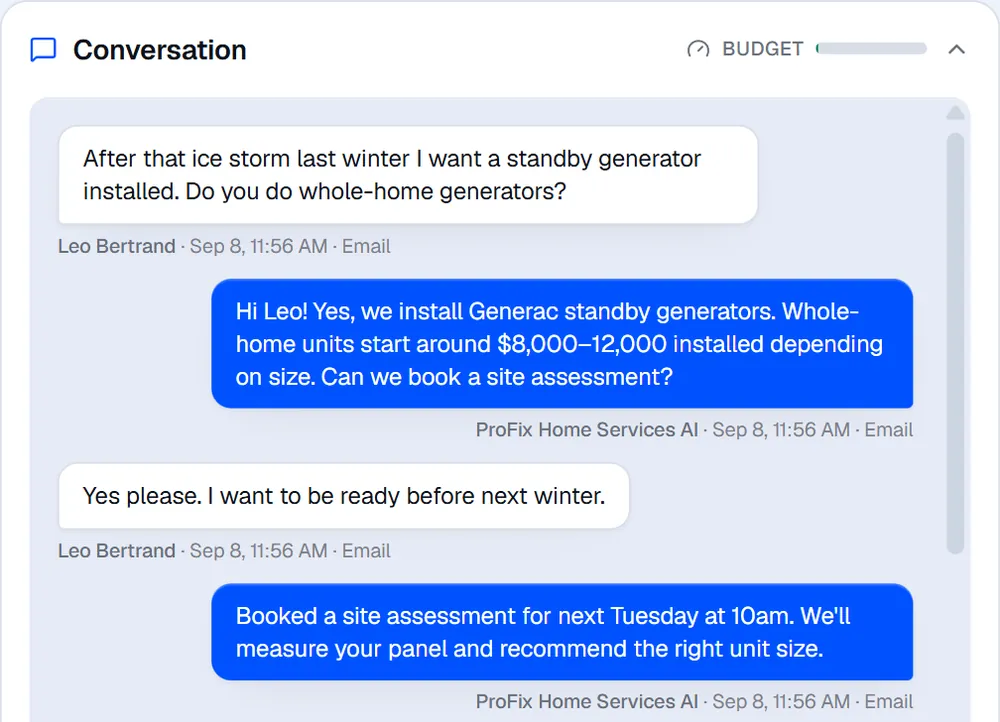
The AI does what a good sales rep does: it gets the lead's questions out of the way, checks the job fits, and only then offers a time.
- Answers from your knowledge base on web chat, text and email, and on the phone with the AI Receptionist
- Asks a couple of qualifying questions (what, where, when) from a brief you write. An optional booking policy can require details before it books.
- Offers real open times from your connected calendar and books the slot in the conversation
- Saves the name, phone, email and full address to the lead, with the source tracked
- Follows up after a no-show with a rebooking message, and a reply to the confirmation can move or cancel the booking
The self-serve booking page
For people who'd rather just pick a time.
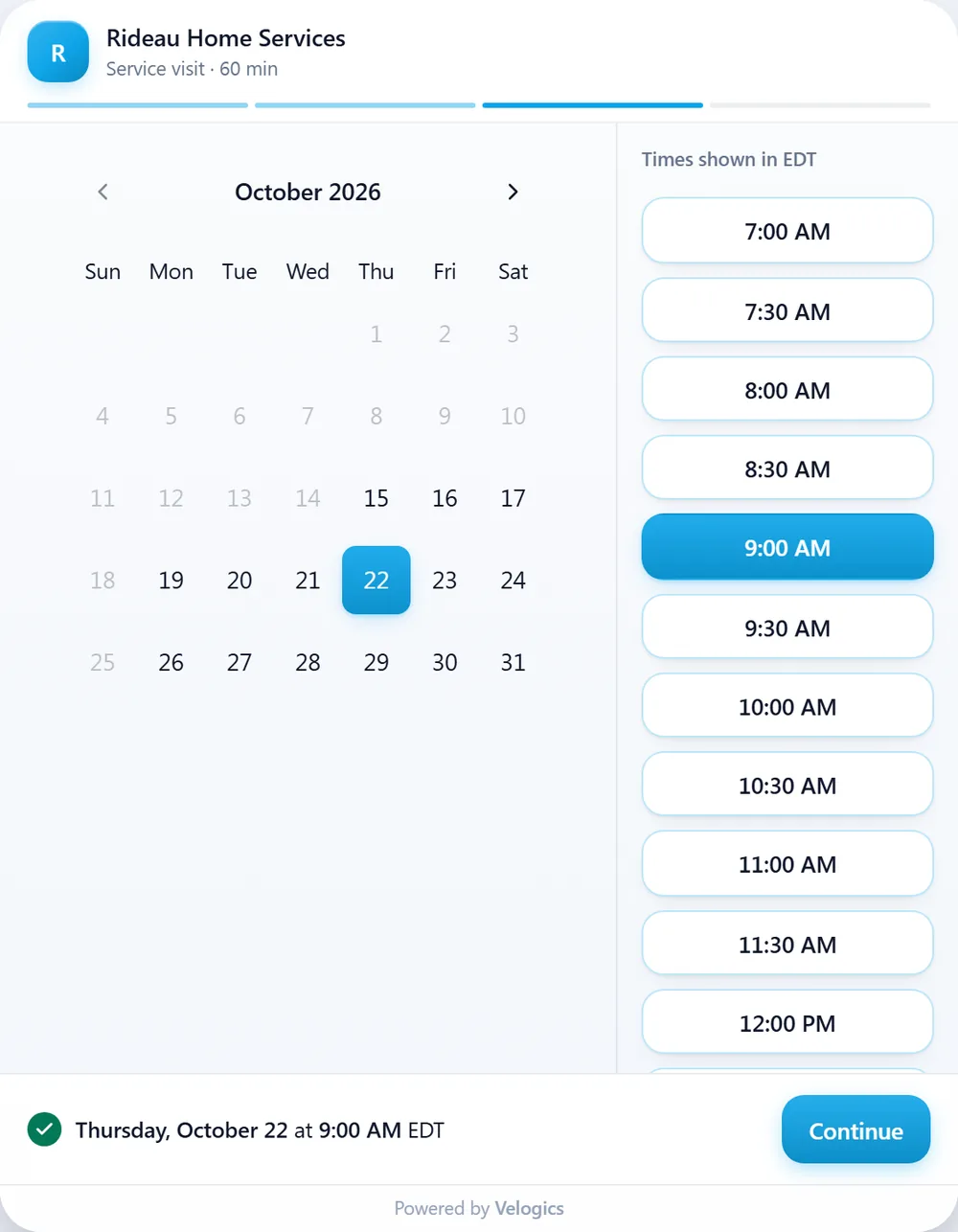
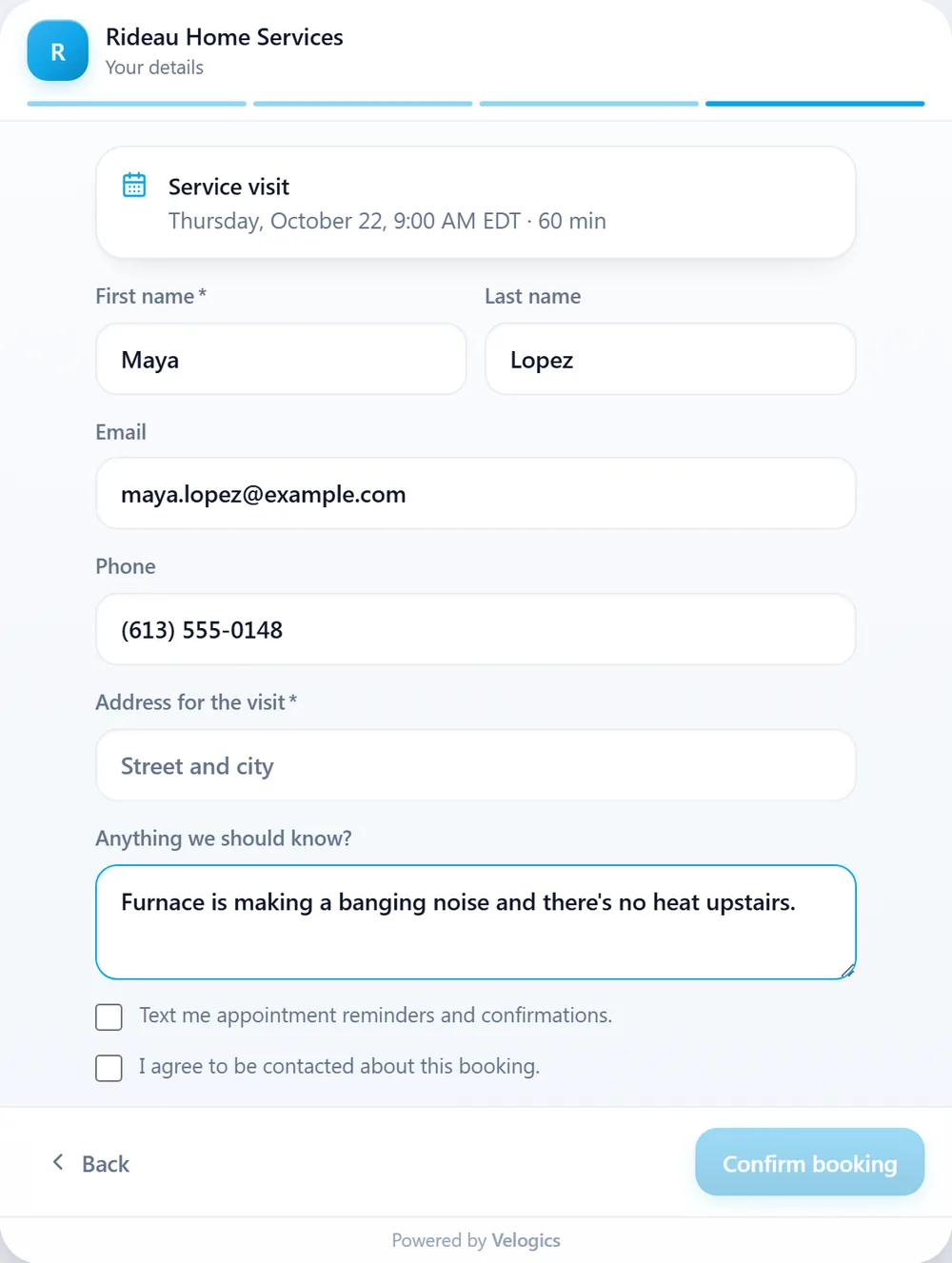
Add a floating booking button to any site, or share the standalone booking page. There's no AI inside it: customers go straight through four steps and see “You're booked”, with a button to add it to Google Calendar.
- 1
Service
The customer taps the service they need.
- 2
Where's the job?
For service calls, they pick their area or enter their postal code, when you route bookings or book days by area.
- 3
Date and time
Arrival windows or open start times for service calls, exact times for meetings, as far ahead as you allow (21 days unless you change it), labelled with your business's time zone.
- 4
Details
First name, email or phone, the address for on-site visits, “Anything we should know?” and consent ticks.
After the booking
Confirmation and reminder
Bookings get a confirmation and a reminder before the visit. From the booking page, the confirmation is an email with a calendar invite, or a text if the customer agreed to texts.
A lead with its source
The customer's details land on a lead in your CRM, with where they came from. Booking-page leads are tagged “booking widget”.
The right crew
Bookings from the booking page, chat, text, email and phone are routed by service and service area onto the matching Google or Outlook calendar.
Send a booking link from the inbox
Talking to a lead yourself? Send them a secure link with their details already filled in. It can suggest a time, so the customer only has to tap “Yes, book it” or pick another.
Feature comparison
What each one does.
Calendly details are basics published on calendly.com, checked on 17 September 2026. Products change, so check calendly.com for current details.
| Feature | Velogics | Calendlyper calendly.com |
|---|---|---|
| Before the booking | ||
| An AI that talks to the lead | Yes. It answers, qualifies and books on web chat, text and email, and on the phone with the AI Receptionist | Lists an AI assistant that schedules over email (beta) |
| Answers questions from your own knowledge | Yes, from your knowledge base | See calendly.com |
| Qualifies the job | Yes. A couple of questions (what, where, when) from a brief you write | Booking questions, plus routing forms that screen and route leads |
| Offers real open times | Yes, from Google Calendar or Outlook | Yes, from connected calendars |
| Scheduling | ||
| Self-serve booking page | Yes: a standalone page and a floating booking button | Yes, its core product |
| Inline embed inside a page | No | Website embeds |
| Routing | By service and service area, to the right crew, on every channel | Routing forms and meeting distribution |
| Round-robin across a team | Partly: among the calendars that fit the service and area, the one with the fewest bookings that day gets it | Yes |
| Buffers and minimum notice | Yes. Up to 72 hours' notice on any booking, and up to an hour kept free around each meeting | Yes, buffers and minimum notice |
| Times in the visitor's own time zone | No. Times show in your business's time zone, labelled | Yes, detected automatically |
| Video appointments | Yes. Phone and video calls book as meetings, using the meeting link you save | Zoom, Google Meet and Microsoft Teams integrations |
| Take payment at booking | No | Yes, through Stripe and PayPal |
| After the booking | ||
| Confirmation and reminder | Confirmation email with a calendar invite (or a text, with consent) and a reminder before the visit | Email confirmations and reminders |
| Reschedule or cancel | The customer replies to the confirmation. No self-service links | Optional cancel and reschedule links in emails |
| No-show follow-up | Yes, a rebooking message | See calendly.com |
| CRM | Built in. The lead is saved with its source | Integrations, including HubSpot and Salesforce |
| Quotes and invoices | Yes, in the built-in CRM. Paid status is recorded, not collected | Invoices and payment links |
| Plans | ||
| Free plan | No | Yes |
| Price | AI Front Desk: $89/mo CAD, with 150 AI conversations a month | See calendly.com |
Which fits
Different tools for different bookings.
If all you book is meetings, Calendly is hard to beat. If you book jobs that need qualifying first, and the calls and estimates around them, that's what Velogics is for.
When Calendly is the better fit
- You mostly book meetings: sales calls, interviews or time with your team, often across time zones.
- You want to take a payment or a deposit when someone books.
- You need full round-robin across a team, or times shown in each visitor's own time zone.
- You want a free plan, or connections to a long list of other tools.
When Velogics is the better fit
- Leads ask questions before they'll book (the price, your area, the timing), and a calendar alone doesn't answer them.
- Your crews work in the field, and each job has to land with the right person for the service and the area.
- You want every lead, booking, quote and invoice in one place, whichever channel it came from.
Use both?
Keep Calendly for your own meetings. Use Velogics for customers.
Plenty of businesses will run both. Calendly keeps handling internal meetings, partner calls and sales demos, and Velogics handles the leads coming in from customers.
Velogics has no Calendly integration, so the two don't pass bookings to each other. Velogics only offers times that are free on your connected Google or Outlook calendar, so a meeting on that same calendar counts as busy time, whichever tool booked it.
FAQ
Velogics vs Calendly, common questions
Is Velogics a Calendly alternative for service businesses?
For customer bookings, yes. If you send leads a booking link today, Velogics gives them an AI that answers their questions, qualifies the job and books it, plus a self-serve booking page for people who'd rather pick a time. For internal meetings or taking payment at booking, Calendly is the better tool.
Does Velogics integrate with Calendly?
No, there's no Calendly integration. You can run the two side by side: Calendly for your own meetings, Velogics for customer leads.
Is the AI inside the booking page?
No. The booking page is self-serve: service, area, time, then details. The AI works in web chat, text and email, and on the phone with the AI Receptionist. From a lead in your inbox you can also send a booking link with their details filled in.
Can Velogics take a payment or deposit when someone books?
No. Velogics doesn't process payments. The built-in CRM creates quotes and invoices and records when an invoice is paid, but the money is collected outside Velogics.
What does Velogics cost?
Online booking comes with AI Front Desk, $89/mo CAD, along with the AI chatbot, smart forms and missed call text back. The AI Receptionist for phone calls is $149/mo CAD. For Calendly's plans, check calendly.com.
Calendly is a trademark of Calendly, LLC. Velogics is not affiliated with Calendly.
Turn booking links into booked jobs.
Book a demo and we'll show the AI answering, qualifying and booking your kind of leads.